The rule in one line: a standard adult t-shirt print size is 12 × 16 inches on the front, which is 1,800 × 2,400 pixels at 150 DPI or 3,600 × 4,800 at 300 DPI. A left chest logo is about 3.5 inches square and a youth front about 9 × 12 inches. Every number in this t-shirt print size guide is a starting point: your print partner's template for the exact blank always wins.
Last checked: November 9, 2026. Print areas come from Podezzy's Design Size Calculator and from the placement guides Printify, 4OVER4 and Printful publish. Etsy market numbers are Podezzy's own snapshot from November 8, 2026.
T-shirt print size by placement
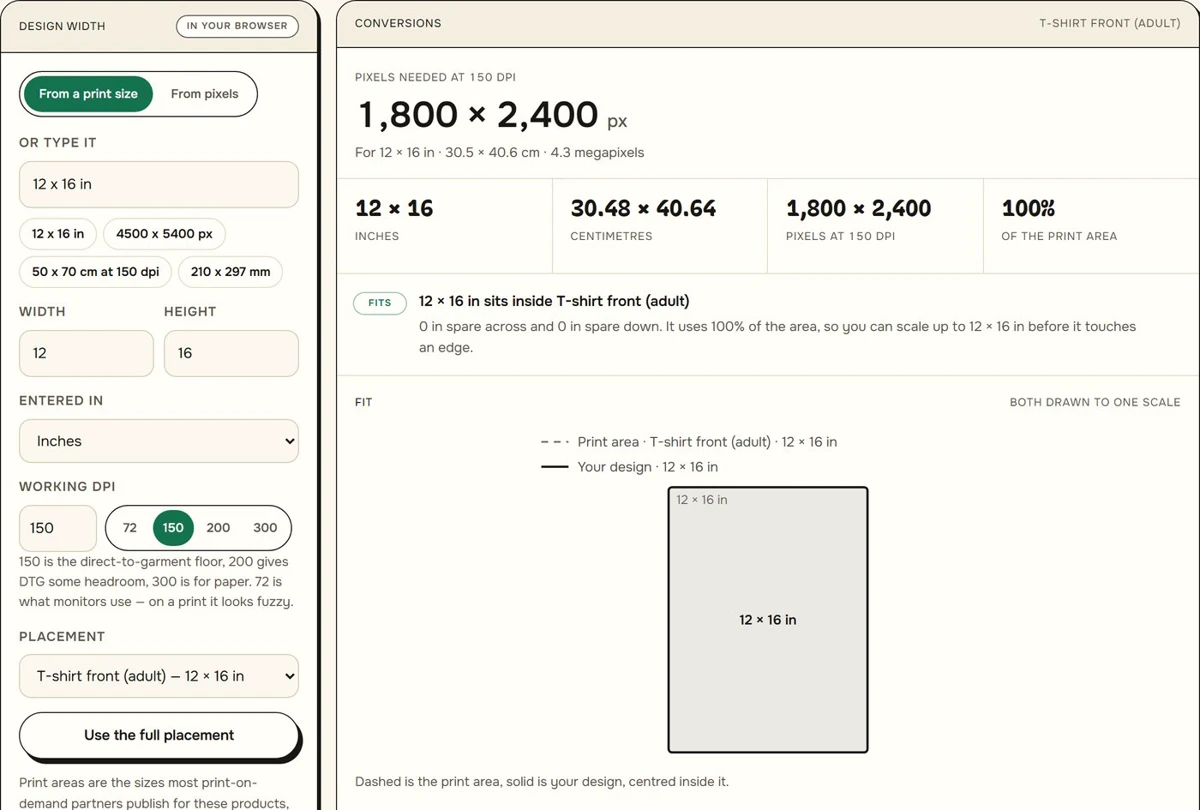
Print providers publish their print areas in inches and want the file in pixels. Pixels are inches × DPI, so a 12 inch wide design needs 1,800 pixels at 150 DPI and 3,600 at 300. These are the placements most sellers use:
| Placement | Print area (in) | Pixels at 150 DPI | Pixels at 300 DPI |
|---|---|---|---|
| Adult front (standard) | 12 × 16 | 1,800 × 2,400 | 3,600 × 4,800 |
| Oversized front | 15 × 18 | 2,250 × 2,700 | 4,500 × 5,400 |
| Youth front | 9 × 12 | 1,350 × 1,800 | 2,700 × 3,600 |
| Left chest | 3.5 × 3.5 | 525 × 525 | 1,050 × 1,050 |
| Sleeve | 3 × 12 | 450 × 1,800 | 900 × 3,600 |
These rows are the presets in Podezzy's Design Size Calculator. Type your own partner's template width and height in inches, pick the DPI, and it returns the pixel size your file needs and whether the design fits the placement.
Providers quote ranges rather than one size. Printify puts a full front at 10 to 12 inches wide and 10 to 14 inches high, a center chest graphic at 6 to 10 inches wide, and a full back at 10 to 14 inches wide. 4OVER4 notes that most adult print areas top out near 12 × 16 inches, front or back. Printful's file guide gives 12 × 16 inches for t-shirts and 15 × 18 inches on select DTG products only.
The oversized row is the one to check before you export. Printful offers 15 × 18 inches on some products, while Printify's guide lists an oversized front at 12 to 15 inches wide and 14 to 16 inches high. Build the file on your partner's oversized template, not on the 15 × 18 preset.
The sleeve preset is a tall 3 × 12 inch strip. Short sleeves take much less: Printify suggests 1 to 3 inches square on a short sleeve, and 4OVER4 gives 1.5 to 4 inches wide with a height of up to 3 inches.
Where the design sits: distances from the collar
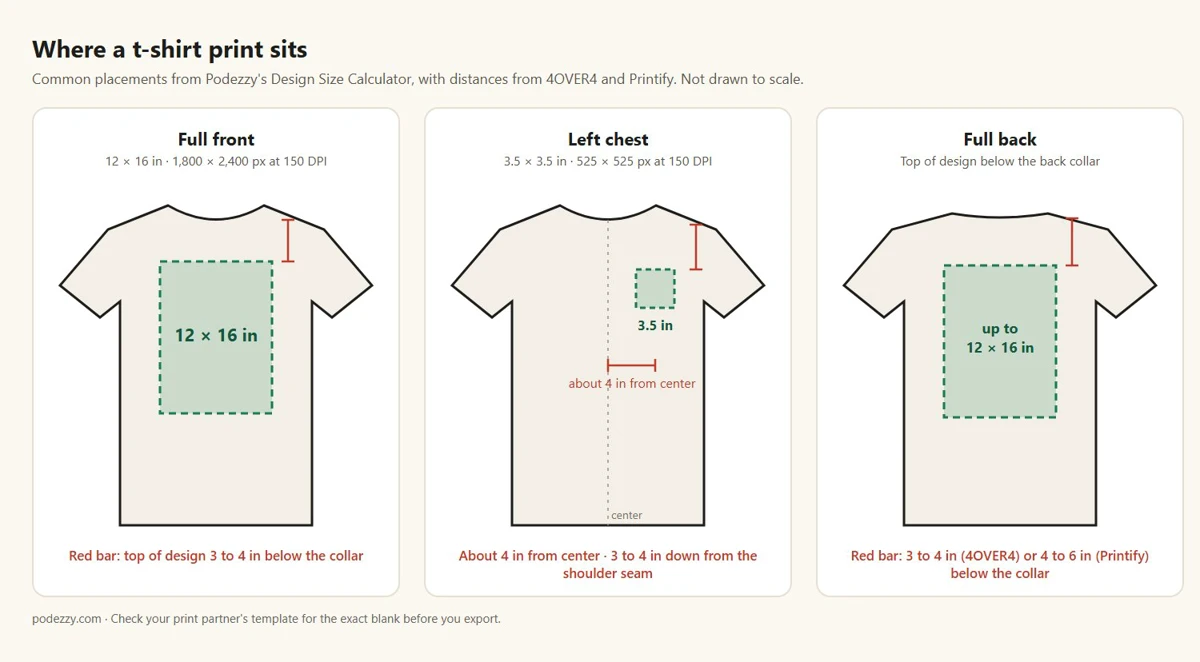
A correct file can still look wrong if it lands too low. These are the placement measurements the guides give:
- Full front: the top of the design 3 to 4 inches below the collar, centered (4OVER4). Printify uses 3 inches for an adult front logo.
- Full back: 3 to 4 inches below the collar in 4OVER4's chart, 4 to 6 inches in Printify's. Pick one and keep it the same across your listings.
- Left chest: about 4 inches in from the center of the shirt and 3 to 4 inches down from the shoulder seam (4OVER4).
- Youth front: the top edge 2.5 to 3.5 inches below the collar (4OVER4).
The distance matters most when the design is shorter than the full area. A 12 × 8 inch slogan centered in a 16 inch tall area sits 4 inches lower than the same slogan aligned to the top.
Does the design size change from S to 2XL?
You rarely need a separate file for adult sizes. Printify says designs are built on a size L shirt, smaller sizes scale the print down, and larger sizes keep the same design size. 4OVER4 says a design that is 11 inches wide on an adult small still fits an adult 2XL comfortably, so you rarely need separate files unless you also print toddler sizes.
One adult file covers a normal S to 2XL run. It is still worth opening your partner's mockup on the smallest size you sell before you list, because that is where a wide design looks biggest.
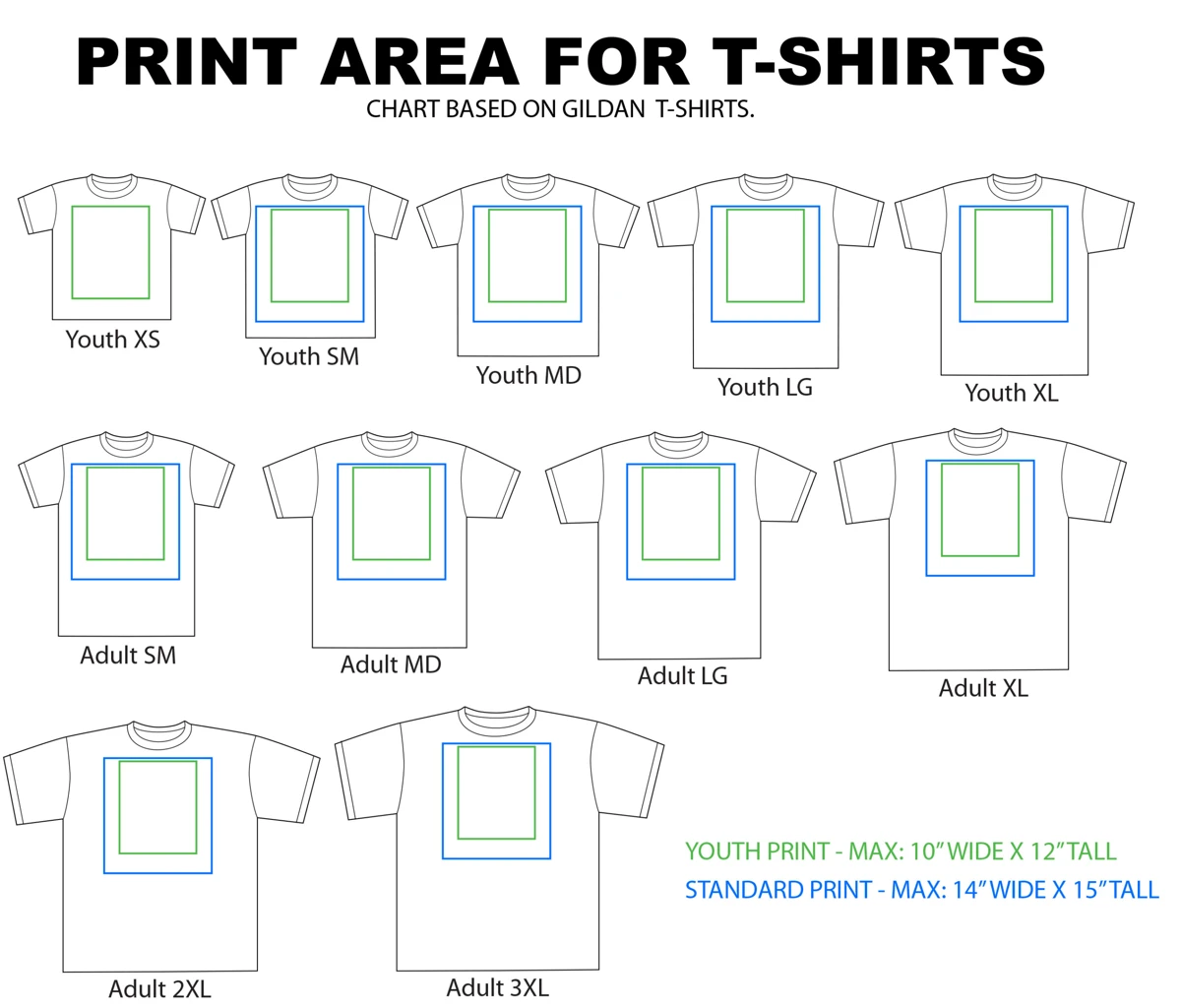
A youth full-front design needs its own file either way. 4OVER4 puts a youth full front at 7 to 9 inches wide and a youth left chest at 3 to 3.5 inches, and the calculator's youth preset is 9 × 12 inches. The Gildan youth size chart shows how much of each youth shirt that file covers, from XS to XL.
Which DPI: 150 or 300?
Use 150 DPI as the floor for a shirt, and 300 DPI when your partner asks for it or the design will also go on paper. Printful calls 150 DPI the sweet spot for Printful products and gives 150 to 300 DPI as the ideal range. Printify and 4OVER4 both recommend 300 DPI at the final print size. The calculator labels 150 as the direct-to-garment floor, 200 as headroom, and 300 as the setting for paper.
Worked example: a full adult front at 150 DPI is 1,800 × 2,400 pixels, and at 300 DPI it is 3,600 × 4,800. Both print at 12 × 16 inches. What decides the quality is the pixel count across the print, not the DPI number stored in the file: an image with 864 pixels across a 12 inch front, which is 72 DPI, prints soft. The longer explanation is in DPI, bleed and the 300 DPI myth.
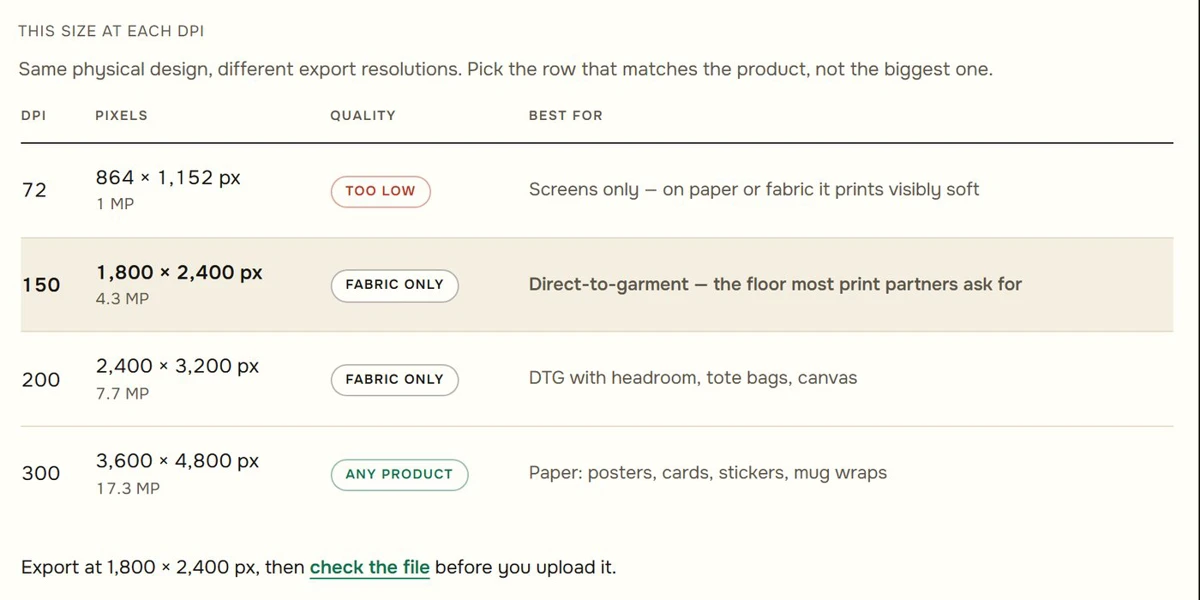
Before you upload, run the file through the Print File Checker. It reads the pixel size and tells you how large it prints at each DPI, in your browser.
What "oversized" means on Etsy right now
Podezzy's Etsy marketplace data (snapshot November 8, 2026, sales are estimates) puts "oversized t shirt" at 1,328 sales in the last 30 days across 13,215 listings and 3,989 shops. Eight of the ten best-selling listings for that search are blank shirts, seven of them tagged "blank shirt", and the best seller is a blank Comfort Colors 1717 sold as oversized.
So most of what sells under "oversized" right now is unprinted blanks. If you print an oversized design, the print area is whatever your partner offers for that blank: 15 × 18 inches only where a partner like Printful offers it, 12 to 15 inches wide on Printify's guide. Check before you build the file.
Totes and mugs
The same arithmetic covers the other products a t-shirt shop usually adds. Calculator presets:
| Product | Print area (in) | Pixels at 150 DPI | Pixels at 300 DPI |
|---|---|---|---|
| Tote bag | 12 × 12 | 1,800 × 1,800 | 3,600 × 3,600 |
| Mug 11 oz wrap | 8.5 × 3.5 | 1,275 × 525 | 2,550 × 1,050 |
| Mug 15 oz wrap | 8.5 × 4 | 1,275 × 600 | 2,550 × 1,200 |
The calculator notes that these vary by provider: a tote runs from 12 × 12 to 14 × 16 inches depending on who prints it, so build the mug or tote file on your own partner's template. Sweatshirts and hoodies often take a different print than a tee, which is covered in sweatshirt and hoodie print size.
Four sizing mistakes that cost a reprint
- A low-resolution file stretched to fit. A 1,000 pixel wide image covers a 12 inch front at about 83 DPI. It uploads fine and prints soft.
- The wrong aspect ratio. A square design dropped into a 12 × 16 area either leaves empty space or gets cropped. Build the canvas at the area's shape first.
- Ignoring the garment size. Printify scales the print down on sizes below L, so the same file looks different across the run. Check your partner's mockup on the smallest size you sell before you list.
- Skipping the sample. Printify's advice is to order one before you list. A sample shows placement and color on the real blank.
What to do next
Take your partner's template size, put it into the Design Size Calculator at 150 DPI (300 if your partner asks for it or the design will also go on paper), and build your canvas at exactly the pixel size it gives you.
T-shirt print size FAQ
What is the standard t-shirt print size?
12 × 16 inches for an adult front, which is 1,800 × 2,400 pixels at 150 DPI or 3,600 × 4,800 at 300 DPI. Printful uses 12 × 16 for its t-shirts and 4OVER4 says most adult print areas top out near that size.
How far below the collar should a shirt design go?
About 3 to 4 inches for a full front, measured from the collar to the top of the design. Back designs go 3 to 6 inches down depending on whose guide you follow.
What size is a left chest logo?
About 3.5 × 3.5 inches, or 1,050 × 1,050 pixels at 300 DPI. Printify allows 2.5 to 5 inches square, and 4OVER4 gives 3.5 to 4 inches.
Do I need a separate file for every shirt size?
Not for adult sizes. Printify builds on a size L and scales the print down for smaller shirts, and 4OVER4 says one adult design rarely needs separate files unless you also print toddler sizes. A youth full-front design needs its own file, at about 7 to 9 inches wide.
Is 150 DPI enough for a t-shirt?
For direct-to-garment printing, yes: Printful calls 150 DPI the sweet spot for its products. Use 300 DPI if your partner asks for it or if the same design will also go on paper products.