
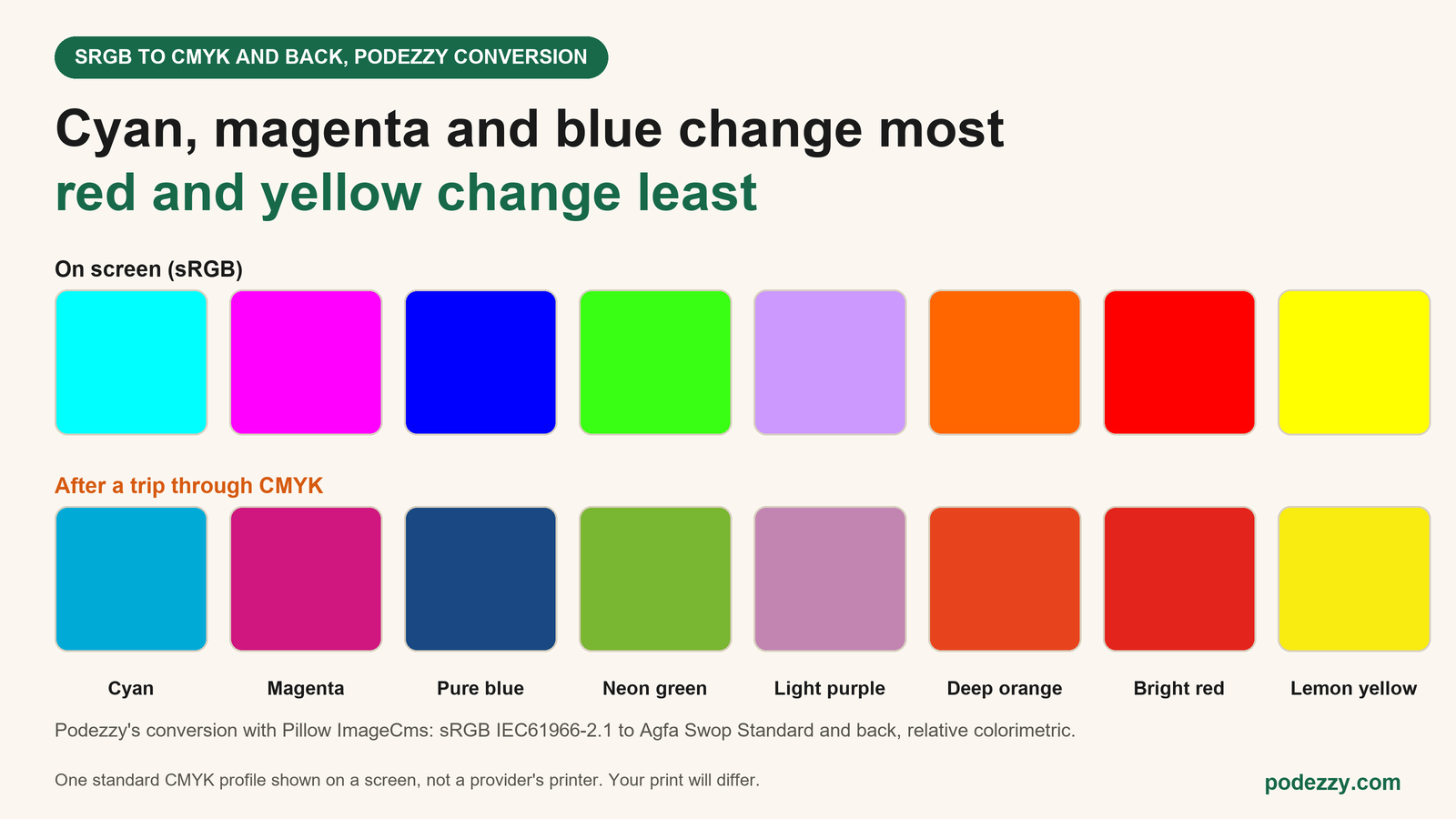
Printful and Gelato (for DTG, or direct-to-garment, shirt printing) ask for sRGB files, the standard color definition for screens. Printify accepts both RGB and CMYK, does all its work in RGB and warns that colors in a CMYK upload might shift significantly. RGB describes a color as red, green and blue light, and CMYK as cyan, magenta, yellow and black ink. Printed colors often come out duller than the screen, because ink on a garment cannot reproduce some of the brightest colors a screen shows, and the conversion to the printer's colors happens after you upload.
Some other pages from the same companies point toward CMYK, and this post says which. Every provider rule names the page it comes from, read on November 23, 2026. Podezzy is a free toolkit for Etsy print-on-demand sellers. It adds two sets of its own data: six test files run through its Print File Checker, and ten colors converted from sRGB to CMYK with named profiles.
Which color mode should you send to a print-on-demand provider?
Providers differ by product, so read the color line for the product you are listing first. Which print provider you use decides which line applies.
| Provider and page | Color it asks for | On CMYK uploads |
|---|---|---|
| Printful, product file guidelines | sRGB | Not recommended as the final file |
| Printify, help center | RGB | Converted to RGB, colors may shift |
| Gelato, DTG design files | sRGB | Page does not say |
| Gelato, PDF uploads | PDF/X-4, sRGB or CMYK | CMYK for neon and stationery |
| Gelato, posters | CMYK PDF/X-4 preferred | RGB files should carry an sRGB tag |
Printful's product pages for the Gildan 5000, Gildan 18500, Bella+Canvas 3001, Comfort Colors 9018, white glossy mug and kiss-cut sticker sheet all say "Create files in sRGB color profile". Its help center article on RGB or CMYK says converting to CMYK before upload "can unnecessarily reduce the available color information and lead to less accurate results". Some of its techniques use inks beyond the standard CMYK set. It also tells sellers to avoid other RGB spaces such as Adobe RGB or ProPhoto RGB, which it says "can cause unexpected color shifts". Printful's blog post of February 12, 2026 adds that its software converts the uploaded file into the color mode its industrial printers need.
Printify's help center article on color profiles says it accepts "files with various color spaces" but does all its operations in RGB. It converts a CMYK upload to RGB, and "the colors might shift significantly". Its design guide says JPEGs are accepted in RGB or CMYK and PNGs can only be RGB. Its print providers convert files to "the appropriate color space and profile, depending on their process".
Printify's blog gave different advice when Podezzy read it on November 23, 2026. Its post of July 15, 2025 says "CMYK is generally the better choice" and recommends designing in CMYK from the start. Podezzy follows the help center and the design guide for uploads, because those two describe what the upload system does.
Gelato's DTG design file guidelines (October 30, 2025) ask for PNG or JPEG at 150 DPI or more in "the sRGB color profile". They also advise designing within the CMYK color gamut for accurate reproduction. Its CMYK DTG color guide of the same date says "Don't rely on automatic conversions" and to convert from RGB to CMYK manually. It does not say to upload a CMYK file. PDF uploads at Gelato follow other rules. Its page on PDF uploads asks for PDF/X-4. It recommends sRGB images for posters and non-paper products, and CMYK for fluorescent colors, brochures and business stationery.
What does Podezzy's Print File Checker report for color?
The checker reports a file's color mode, such as RGB or CMYK, and does not report the embedded color profile. Podezzy ran six test files through it on November 23, 2026. Each has the same artwork, six saturated circles at 1,800 by 2,400 pixels, and the print area was the adult T-shirt front preset.
| Test file | Colour line reported | Colour status |
|---|---|---|
| PNG, sRGB profile embedded | RGB + alpha, 8-bit | PASS |
| PNG, no profile | RGB + alpha, 8-bit | PASS |
| PNG, Display P3 profile embedded | RGB + alpha, 8-bit | PASS |
| PNG, Adobe RGB profile embedded | RGB + alpha, 8-bit | PASS |
| JPEG, sRGB, white background | RGB, 8-bit | PASS |
| JPEG, CMYK profile embedded | CMYK, 8-bit | WARN |
The tagged and untagged sRGB files, and the two wide-gamut files (Display P3 and Adobe RGB, which can store more saturated colors than sRGB), drew the same line. A PNG in Display P3 or Adobe RGB therefore passes the Colour check, although Printful's help center tells sellers to avoid those spaces. The profile has to be confirmed in your design app's export dialog. Podezzy built the Display P3 and Adobe RGB profiles for this test from the published primaries, so they are test profiles, separate from Apple's and Adobe's own files.
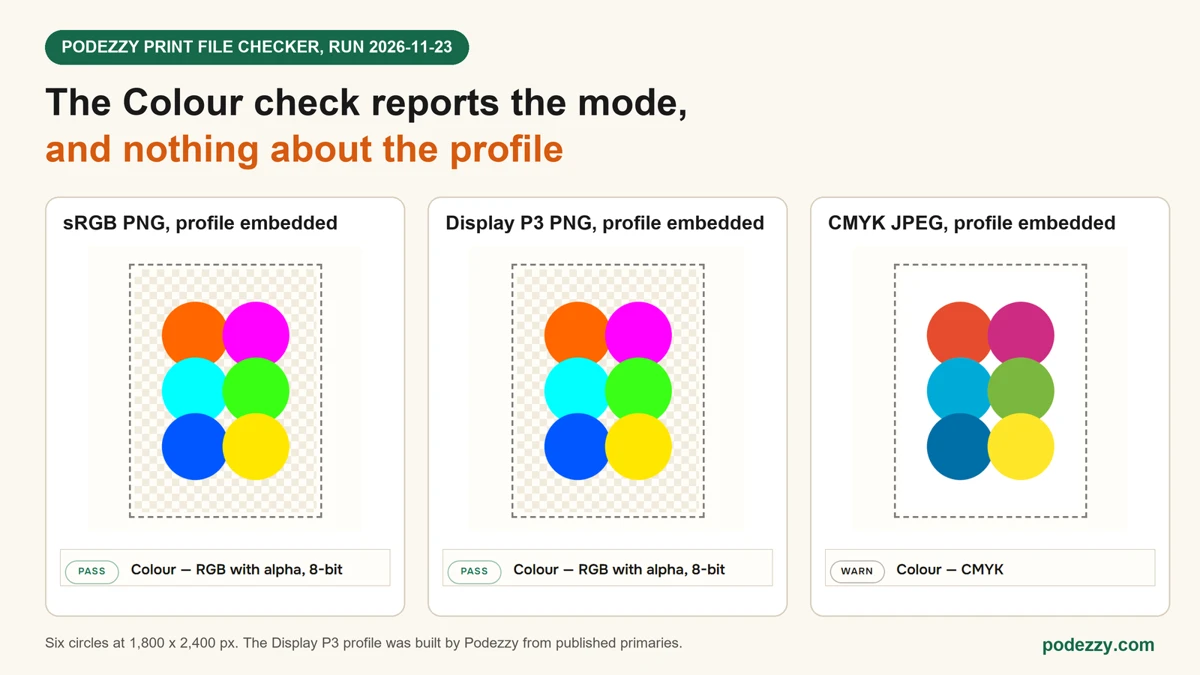
The CMYK JPEG was the only file with a color warning. The warning calls CMYK "a press-printing colour mode" and says Printful and Gelato ask for sRGB files and do the conversion for their printers themselves, while Printify warns that colors in a CMYK upload might shift significantly. It adds that converting to CMYK first "can dull brights for no gain" and asks you to re-export in sRGB and compare before uploading. That matches the help pages cited in this post, with one difference in emphasis: Gelato's CMYK DTG color guide also tells sellers to adjust colors by hand instead of relying on automatic conversion. In the checker, the CMYK file's preview looked flatter than the sRGB file's, and the warning says the preview can look off for the same reason.
To see which mode your own export is in, upload the PNG or JPEG you plan to send to Podezzy's Print File Checker. Pick the print area that matches your product and read the Colour line. It runs in your browser and nothing is uploaded.
Why do printed colors look different from the screen?
A screen mixes red, green and blue light, and some of the colors it can show cannot be made with ink. Printful says RGB has a wider gamut (a bigger range of reproducible colors) than traditional CMYK, so some bright neon and saturated colors have no exact printable equivalent. Printful adds that the printing system maps such out-of-gamut colors (colors outside what the printer can make) to the closest printable option, which can look less bright, darker or duller.
Other causes sit on the garment side. Gelato says printers and their color profiles differ, fabric color changes how ink looks, and ink looks brighter on white fabric than on colored garments. Printify lists the provider's workflow, garment color and material, and your monitor settings. It says "navy blue and dark purple colors are known to shift".
sRGB is a fixed target. The International Color Consortium's registry lists it as defined by IEC 61966-2-1:1999, with a gamut based on CRT displays and a D65 white point. A wide-gamut file stores different numbers for the same color. In Podezzy's test, the neon green circle is 57, 255, 20 in the sRGB file, 127, 251, 80 in the Display P3 file and 151, 255, 64 in the Adobe RGB file. A system that ignored the embedded profile would read the Display P3 numbers as sRGB, which is a paler green (#7FFB50).
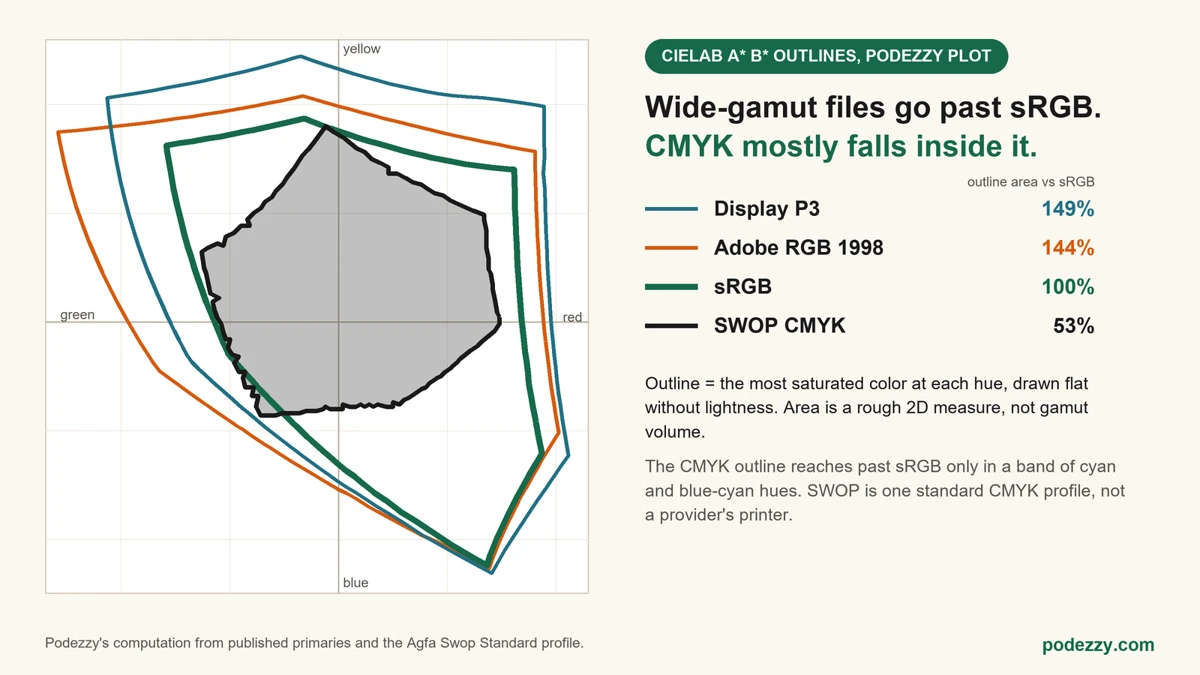
Podezzy drew the color range of four color spaces on one flat map of hue and saturation, called the CIELAB a* and b* plane, which leaves out lightness. The four are sRGB, Display P3, Adobe RGB (1998) and the Agfa Swop Standard CMYK profile. Measured by the area each outline covers, a rough two-dimensional measure that says nothing about volume, Display P3 covers 149% of sRGB's area and Adobe RGB 144%, while the CMYK outline covers 53%. The CMYK outline sits inside sRGB's for about nine in ten hues and reaches past it in a band of cyan and blue-cyan hues. SWOP is one standard CMYK profile. Printful says some of its techniques use inks beyond CMYK, and none of the pages read publishes the gamut of a provider's printer, so a real garment outline will differ.
Which colors shift most when sRGB becomes CMYK?
Pure cyan, dark navy, magenta, pure blue and neon green shifted most in Podezzy's conversion. Red, yellow and gold moved least. Podezzy converted each color from sRGB to CMYK and back with Pillow's ImageCms (LittleCMS). The profiles were Windows' sRGB IEC61966-2.1 and Agfa Swop Standard for CMYK (a profile is a file that tells software how to turn a file's numbers into colors), with standard conversion settings, relative colorimetric intent and black point compensation. The last column is CIEDE2000, a standard color-difference formula: 0 means identical and a bigger number means further apart, so cyan's 25.2 is a far bigger change than gold's 2.5.
| Color | On screen (sRGB) | After CMYK round trip | Difference (CIEDE2000) |
|---|---|---|---|
| Cyan | #00FFFF | #00AAD7 | 25.2 |
| Dark navy | #0A0A2A | #191B14 | 21.5 |
| Magenta | #FF00FF | #D0167F | 20.5 |
| Pure blue | #0000FF | #194882 | 19.2 |
| Neon green | #39FF14 | #79B631 | 17.8 |
| Light purple | #CC99FF | #C285B2 | 14.9 |
| Deep orange | #FF6600 | #E7441E | 11.6 |
| Bright red | #FF0000 | #E3241C | 5.6 |
| Lemon yellow | #FFFF00 | #F8EC10 | 4.3 |
| Metallic gold | #D4AF37 | #DFB237 | 2.5 |
This is a numerical conversion on one standard profile. Printful's help center warns that online RGB-to-CMYK converters "only find the closest numerical CMYK match" and "don't simulate how the color will actually look when printed". None of the provider pages read names the Agfa profile. Use the numbers to rank which colors are fragile. It does not predict your print.
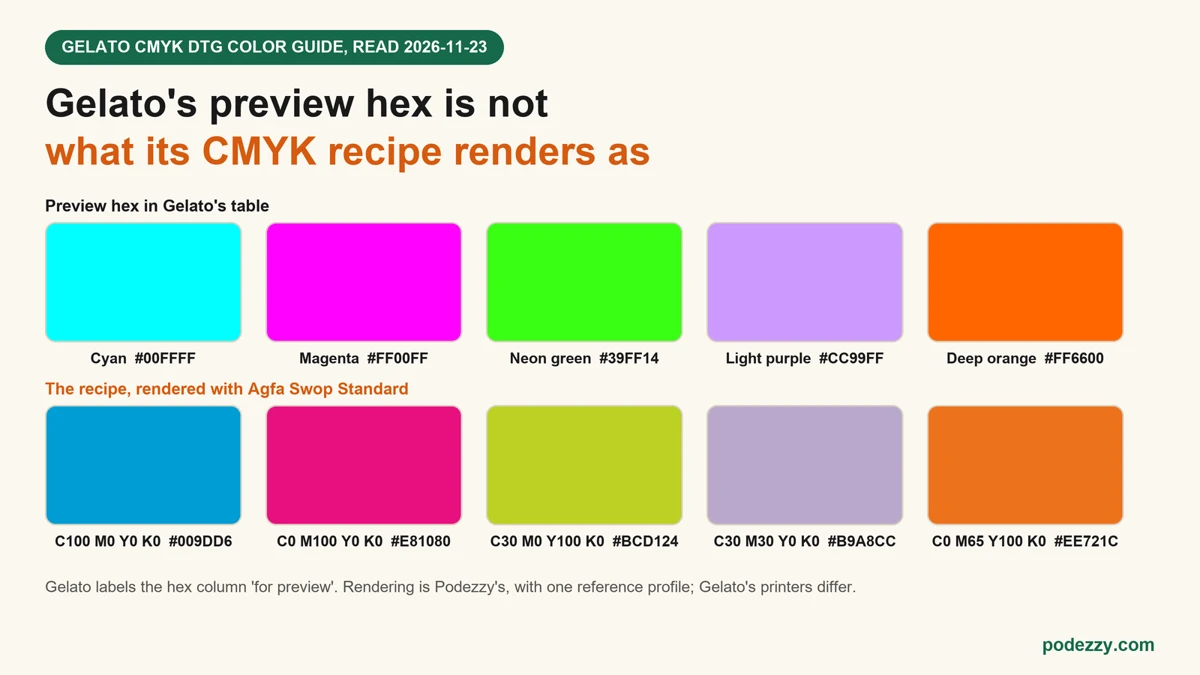
Nine of the ten colors are the hex values listed in Gelato's CMYK DTG color guide, which sorts colors into best, tricky and difficult. Pure blue is Podezzy's addition. Podezzy's ranking agrees with Gelato's on neon green, light purple and dark navy. Dark navy is the clearest case: #0A0A2A came back as #191B14, a near-black with no blue left, which fits Gelato's note that it "can turn muddy or too dark". The two rankings differ on cyan and magenta, which Gelato lists as best performers. Gelato's table starts from CMYK recipes, such as 100, 0, 0, 0 for cyan, and gives a hex beside each, labeled "for preview" in its best-performing table. Run through the same Agfa profile, the cyan recipe renders as #009DD6, not the #00FFFF in Gelato's column, and the neon green recipe (30, 0, 100, 0) renders as #BCD124, a yellow-green. A CMYK recipe is already written in ink values, so it sits inside the CMYK gamut. The same color picked on an RGB screen may not.
Two colors left out of the ten show another difference: Gelato lists pastel peach as tricky, yet Podezzy's conversion scores it 4.2, close to lemon yellow's 4.3, while sky blue, which Gelato lists as best, scores 7.3.
Gold shows the limit of the numbers. The flat gold hex barely changed, with a difference of 2.5, yet Gelato's guide lists metallic gold as difficult because "CMYK can't simulate metallics". A hex value cannot carry a metallic finish. Gelato's guide also says to avoid colors that rely on Pantone spot inks. A hex shown beside a Pantone code is a screen value too, as the hex column in Podezzy's table of past Pantone Colors of the Year notes.
How to prepare a file so the colors survive
- Read the color line on the product page of the provider that will print it.
- Export a PNG in sRGB IEC61966-2.1 with the profile embedded. Printful names that profile and accepts PNG or JPEG, and Printify says PNGs can only be RGB.
- Preview the print without changing the file. Printful's help center recommends soft proofing (previewing the CMYK result on screen) in Photoshop or Illustrator with PSO Coated v3 as the CMYK space. Printify says to convert to CMYK in your design app, look, undo the change and export in RGB.
- Pull back the colors that shifted most in the conversion: neon greens, pure cyan and magenta, saturated blues and very dark navy. Printful says to adjust out-of-gamut colors manually, and Gelato's DTG guidelines say to avoid neon colors.
- Order a sample before you list. Printful's FAQ, Printify's blog and Gelato's CMYK guide all say to.
Color is only one part of file prep. Resolution matters too: Printful's Gildan 5000, Gildan 18500 and Bella+Canvas 3001 pages ask for at least 150 DPI, the 150 DPI floor for garments that Podezzy's DPI guide recommends.
RGB vs CMYK FAQ
Should I upload RGB or CMYK to Printful?
RGB, specifically sRGB IEC61966-2.1, according to Printful's help center. It recommends against CMYK uploads and says to use CMYK only to preview. Its product pages say "Create files in sRGB color profile".
Does Printify convert CMYK files to RGB?
Yes, according to its help center. It accepts files in various color spaces, converts a CMYK upload to RGB and warns that the colors might shift significantly. Its design guide says JPEGs can be RGB or CMYK and PNGs can only be RGB.
What color profile does Gelato want for a DTG shirt design?
sRGB, according to its DTG file guidelines of October 30, 2025, which also advise designing within the CMYK gamut. Its page on PDF uploads asks for PDF/X-4.
Why do my printed colors look duller than my screen?
Screens show bright RGB colors that ink cannot fully reproduce, and Printful says out-of-gamut colors are mapped to the closest printable color. Garment color, the white ink layer printed under colors on dark garments (the white underbase) and the provider's printer change the result too, so order a sample.
Can I upload a Display P3 or Adobe RGB file?
Printful's help center says to avoid RGB spaces other than sRGB, such as Adobe RGB and ProPhoto RGB, because they can cause unexpected color shifts. The Printify and Gelato pages read for this post do not address wide-gamut files, and Podezzy's checker reports them as plain RGB. Convert the file to sRGB in your design app before you export, as Printful asks.